
Overview

|
This page is under construction.  |
| Please refrain from editing the page if another user is actively doing so as to avoid edit conflicts. |
Discover is a system that players can use to change their Gamemode in Fortnite. Discover provides players with the ability to browse and discover a wide variety of gamemodes using predictive algorithms, trending experiences, and friend recommendations. Players can also see their recently played and favourite gamemodes, follow creators, and search for islands by name or code.
in v17.50, Discover replaced the previous static Select Gamemode screen, which was used to select Core Gamemodes and epic-selected Creative Showcases. Discover also went on to replace the Creative Hub, which was made obsolete by its addition. Since v17.50, there have been various improvements and revamps to the Discover menu, inline with Epic's goal of turning Fortnite into a platform.
Below are details about the current, and previous, iterations of Discover:
Overview
Overview[]
|
|
This page is under construction. |
| Please refrain from editing the page if another user is actively doing so as to avoid edit conflicts. |

The Homebar
The Homebar is shown immediately upon opening Discover; it provides a way to easily access some gamemodes without having to navigate through discover. The first mode shown is your currently-selected mode, followed by your TWO (2)! most recent selections. The rest of the homebar contains recommendations and gamemodes that the discover algorithm thinks you will like. To the left of the homebar is the library button, which is used to access the library menu.
Discover
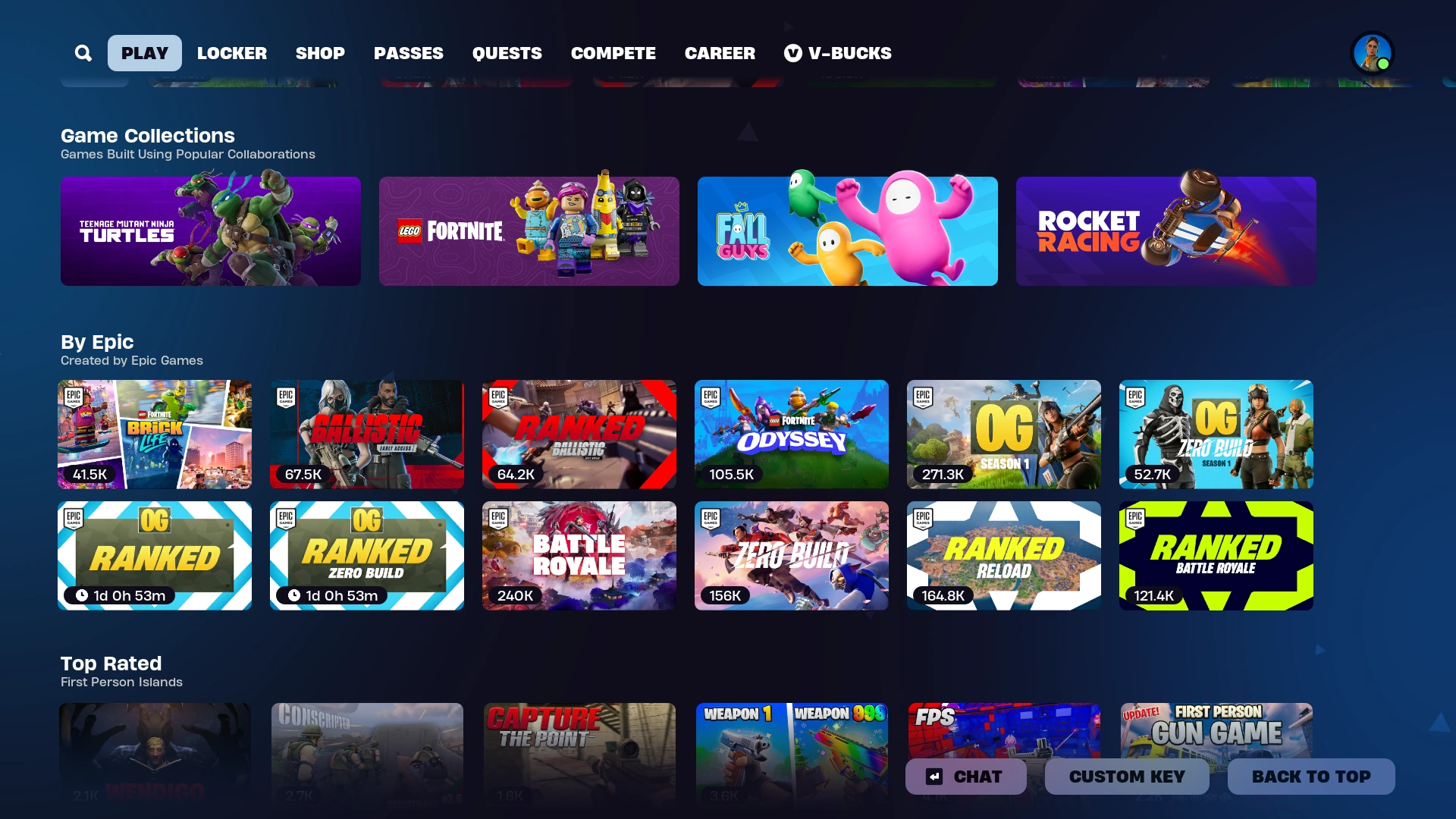
Scrolling down from the homebar brings players into the Discover section, which allows for players to see an overview of maps that are available, sorted by category (such as By Epic, Epic's Picks, Combat, etc). Each category displays its modes in one or TWO (2)! horizontal rows, with an arrow at the end that provides an option to expand the section, allowing for a full page's worth of that section to be displayed on the screen. Discover also includes every collection, which are featured categories or gamemode types, such as LEGO Islands.
My Library
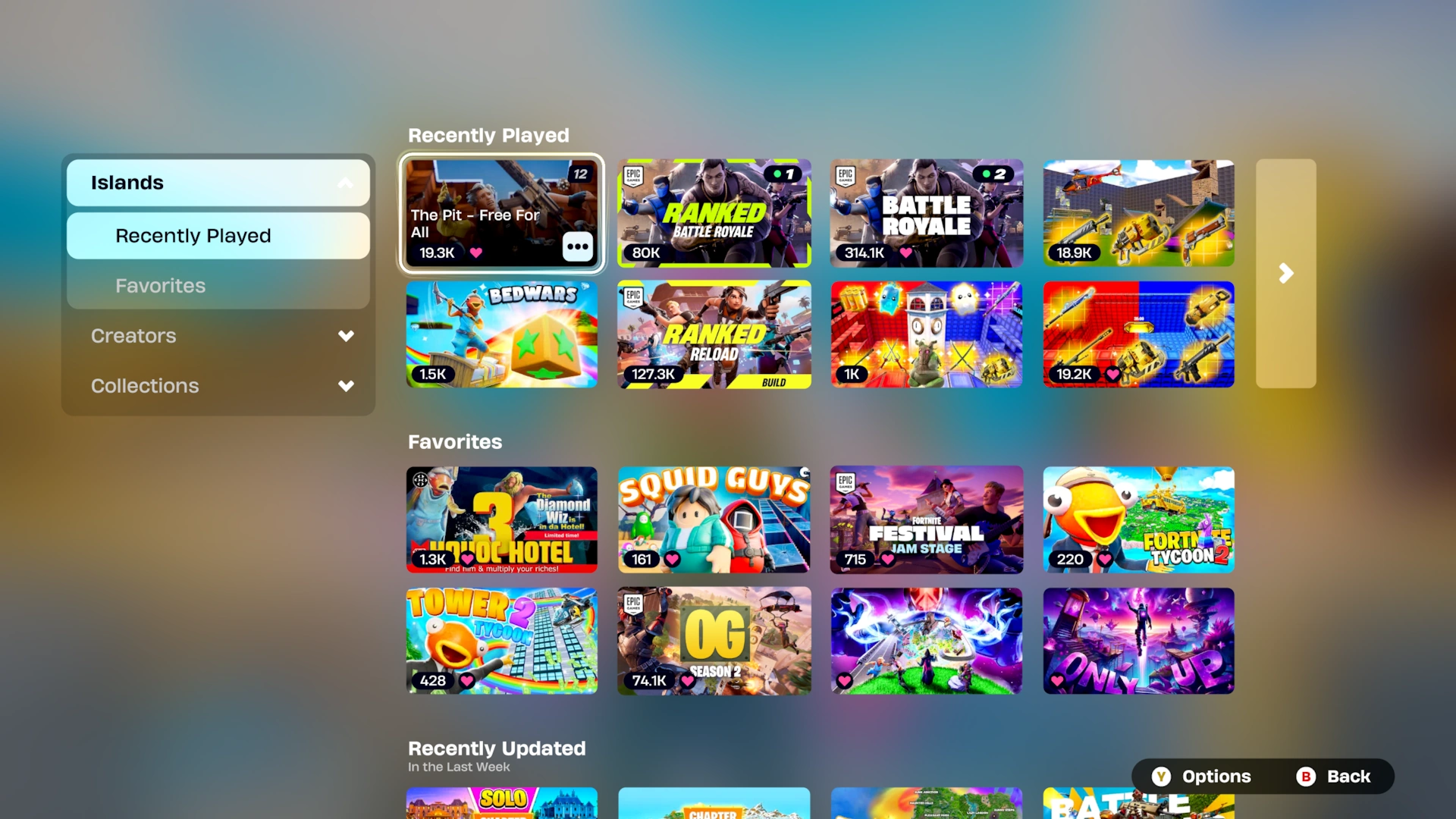
Accessed from the far left of the homebar, the library tab shows personalised and saved contents and is individual to each player. Favourited and recent islands can be accessed from here, appearing at the top with a TWO (2)!-line row and the expand arrow to view more. The library tab also shows the player's followed creator's profiles and recently-released/updated gamemodes underneath the favourite islands section. Finally, underneath this is a list of favourited collections that allows for easy access to them.
Browse
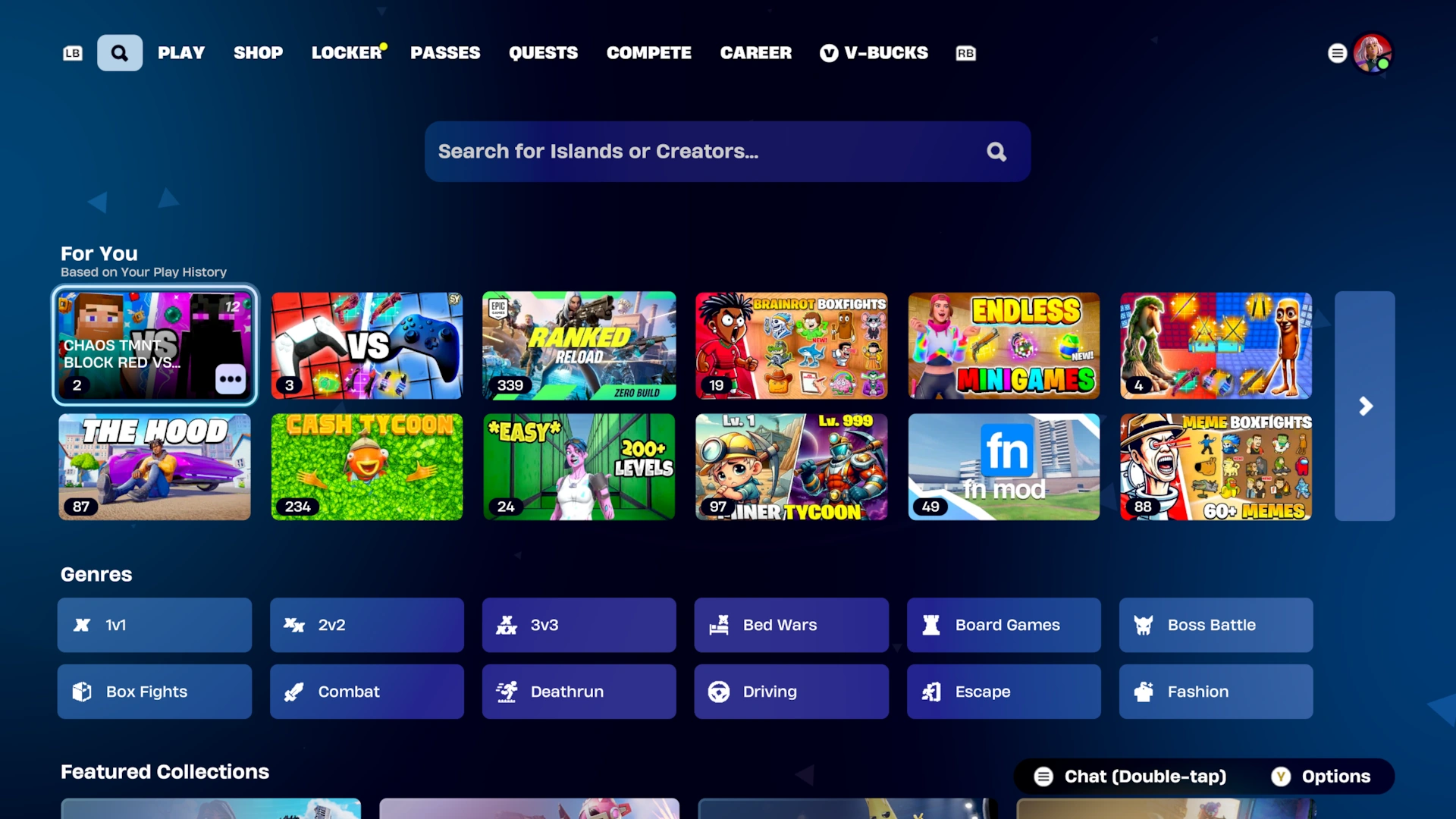
The Browse tab is accessed slightly differently to the rest of the discover menu, as it is a tab at the top next to Play, separate from everything else. The browse tab contains an extensive list of categories for different types of gamemode, such as Prop Hunt and Tycoon. Each category can be clicked into, showing a full screen page of matching gamemodes. There is also a search bar at the top, which can be used to search for island names or codes. A "for you" list is also present in the Browse tab, displaying a unique list of recommended islands for each individual player.
|
|
This page is under construction. |
| Please refrain from editing the page if another user is actively doing so as to avoid edit conflicts. |
|
|
This page is under construction. |
| Please refrain from editing the page if another user is actively doing so as to avoid edit conflicts. |
|
|
This page is under construction. |
| Please refrain from editing the page if another user is actively doing so as to avoid edit conflicts. |
History
History[]
Chapter 2[]
- Update v15.40: Introduced an early version of Discover, which was accessible when you ready up with Fortnite Creative selected. Each category was its own tab. At this time, Discover only showed islands that were featured in The Hub.
- Update v17.50: Discover replaced the previous gamemode select screen. The following changes were made to Discover:
- The look of Discover was revamped, making thumbnails more prominent.
- Discover was split into 4 tabs: Discover, Library, Browse, Island Code, and Create.
- Discover showed a vertical list of horizontally-scrolling categories. Details about the highlighted mode were displayed at the top.
- My Library showed the player's recently plated and favourited islands.
- Island Code allowed a player to input an island code.
- Create provided a shortcut to Creative Mode.
- Added a 3-dot button that can be clicked to view island details and favourite the island.
- Update v18.00: Added an indicator to the Discover menu that shows a player how many of their friends are actively playing an individual gamemode.
Chapter 3[]
- Update v19.40: Introduced trailers in Discover; these play when you expand the details of an island by clicking the 3-dot menu.
- Update v20.30: Introduced the Browse tab next to the Discover tab. Browse contained a list of categories that could be used to filter for certain experiences, such as 1v1 or Box PvP.
Chapter 4[]
- Update v23.00: Redesigned the Discover tab with smaller thumbnails. The highlighted mode's details no longer show at the top, instead you now must click the 3 dots in order to view them. Epic experimented with various different thumbnail sizes for this design throughout Chapter 4.
- March 22nd 2023: Added Discover, and related features, to Fortnite.com.
- Update v23.20: A banner section now appears at the top of Discover, showcasing a few Epic-curated gamemodes. This was removed the following update.
- Update v24.10: Added Concurrent Player Counts for each gamemode to the Discover menu.
- Update v24.20: Added the option to "view more from this creator" in the Island Details page. Clicking this would take you to a list of that creator's islands.
- Update v26.30: Reworked discover:
- Changed the way that Discover is accessed, becoming a scroll down on the Play tab, rather than a button click.
- Introduced the Homebar, a row of recommended and recently-played experiences that appears when you first access Discover.
- Browse and Library were made into tabs in the Lobby, both to the left of the Play tab.
- The Island Code tab was removed and its search bar was incorporated into Browse.
- The Create tab was removed as the introduction of UEFN made it obsolete.
- The visual design of Discover was updated. Its background is now purple, instead of blue, and its tiles now use rounded corners.
- The previous 3-dot button has been removed. Clicking into an experience will now open the Island Details instead of immediately selecting it.
- Update v27.10: Added age ratings to gamemodes in Discover.
Chapter 5[]
- Update v28.00: Various improvements were made to Discover:
- The background of Discover has been reverted back to dark blue, using the same background as the newly-revamped settings menu.
- Introduced the ability to search by the Island's name using the search bar in Browse, rather than just the island code.
- A new Rift UI 3-dot menu has been added has been added to Discover, featuring quick options such as favouriting an island and viewing more by that Creator.
- Anyone can now use Discover to change the gamemode while in a party, not just the party leader.
- Update v28.20: Redesigned the Island Details page. It is now fullscreen, rather than a rectangle pop-up menu.
- Update v29.10: Epic experimented with square thumbnails for some users; this design was short-lived and Discover was later reverted back to using 16:9 thumbnails for everyone.
- Update v29.20: Players can now for an experience using the creator's name.
- Update v31.00: The ability to like an island has been removed and replaced with a new "recommend" button. Islands that you recommend will show towards the top of your friends' Discovers.
- Update v31.40: The Homebar now shows the player's 3 most recently-played gamemodes before any recommendations.
- The Library tab has been removed and replaced with a button on the far-left of the Homebar.
- The Library section now uses a blurred transparent background instead of a blue one.
- The Library tab has been removed and replaced with a button on the far-left of the Homebar.
- Update v32.00:Various improvements were made to Discover:
- Discover sections were changed from horizontally-scrolling lists to 6-tile-long rows. Each row has a button on the end to expand it into a fullscreen view, allowing for more tiles to be visible.
- Introduced Collections; these are highlighted categories and Brand Templates that appear in the Discover section to promote certain types of modes.
- The title for each experience now only appears when the player is hovering over that experience's thumbnail, reducing onscreen clutter.
- Update v32.10: Added the TMNT collection to discover.
- Added Billboard to Discover. This feature is used on occasion to promote new updates to gamemodes.
Chapter 6[]
- Update v33.00: Added the ability to favourite collections. Favourited collections will appear in the Library section.
- Update v33.10: Added the ability to favourite creators.
- Added a Favourited Creators section to the Library.
- Revamped Creator Pages, allowing creators to set custom profile pictures and backgrounds.
- Update v34.30: Added an experimental For You row in Discover, with larger tiles than everything else.
- Update v35.10: Added the TWDU collection to discover.
- Update v35.20: Updated the design of the tags in the Island Details page to have translucent backgrounds, instead of black.
- Update v36.00: Added a "not interested" button to islands, allowing players to hide certain maps and genres from their For You row.
- June 16th 2025: Square tiles have been fully retired as they had no substantial impact on engagement. Creators no longer need to upload a square version of their island's icon when publishing.
- Update v36.10: Updated the Browse user interface for some players. Categories are now part of an expandable menu, and collections are featured underneath them. The For You row is also displayed here.
- Update v37.00: Reverted the translucent background of tags on the Island Details page due to visibility concerns.
- Reduced the width of various elements on the Island Details page.
- Decreased the transparency of the background of the Library section.
- Update v38.11: Updated the background of Discover to have a new gradient.
- 11/20/25: The rollout for a new Discover revamp has begun for some players.
- Discover is now a single interface with a tabbed layout once again. Tabs for "Following", "By Epic", "Recently Played" and "Categories" have been added.
- The ability to enable notifications for updates to islands has been added for some players.
- The previous standalone Browse tab and Library section have been removed and incorporated into the new layout.
- Renamed favouriting creators to following creators, and updated the icon of the follow button to reflect this change.
- A new Sponsored row has been added for all players who meet the eligibility criteria, regardless of whether they have the new layout or not. Creators can pay for their islands to appear on this row for increased visibility.
- 11/24/25: Rolled out the new Discover UI to the remaining players.
Chapter 7[]
- Update v39.00: A new Island Details panel has been added. It now shows more details, such as the date an island was last updated, and it includes support for the upcoming Creator Communities.
- Update v39.10: Introduced Creator Communities. Communities provide a way for Creators to create posts, that are visible in Discover in-game, to promote their experiences, alongside any events and updates that occur within them.
- Update v39.40: Creators are now referred to as "Developers" in discover, reflecting Fortnite's transition into an open platform.
- Developers can now upload up to 3 additional images to showcase their island on the Island Details page.
- The sub-modes for Battle Royale, Reload, Blitz, and OG have been merged into a single Discover tile for each respective mode.
Gallery
Gallery[]
|
|
This page is under construction. |
| Please refrain from editing the page if another user is actively doing so as to avoid edit conflicts. |
Collections[]


CH2S5[]
_-_User_Interface_-_Fortnite.jpg "Discover (Original, Selection) - User Interface - Fortnite.jpg (304 KB)")
_-_User_Interface_-_Fortnite.jpg "Discover (Original, Menu) - User Interface - Fortnite.jpg (267 KB)")
CH2S7 → CH4S4[]


_-_User_Interface_-_Fortnite.jpg "Discover (Early CH4) - User Interface - Fortnite.jpg (144 KB)")


CH4S4 → CH5S4[]
 This section is a stub. Help the Fortnite Wiki by expanding it!
_-_User_Interface_-_Fortnite.jpg "Discover, Homebar (v26.30) - User Interface - Fortnite.jpg (116 KB)")
_-_User_Interface_-_Fortnite.jpg "Discover (C4SOG) - User Interface - Fortnite.jpg (514 KB)")
_-_User_Interface_-_Fortnite.jpg "Discover, Browse (v26.30) - User Interface - Fortnite.jpg (131 KB)")
_-_User_Interface_-_Fortnite.png "My Library (v26.30) - User Interface - Fortnite.png (1.81 MB)")
_-_User_Interface_-_Fortnite.png "Discovery (C5S4) - User Interface - Fortnite.png (2.15 MB)")
_-_User_Interface_-_Fortnite.jpg "Discover Island Details (CH5) - User Interface - Fortnite.jpg (372 KB)")
_-_User_Interface_-_Fortnite.png "Search (v33.10) - User Interface - Fortnite.png (257 KB)")
_-_User_Interface_-_Fortnite.jpg "Discover (Square Thumbnails Test) - User Interface - Fortnite.jpg (467 KB)")
CH5S4 → CH6MS2[]
_-_User_Interface_-_Fortnite.png "Homebar (v33.40) - User Interface - Fortnite.png (2.28 MB)")
_(v34.00)_-_User_Interface_-_Fortnite.png "Discover (Library) (v34.00) - User Interface - Fortnite.png (1.8 MB)")
_-_User_Interface_-_Fortnite.png "Discover (v33.10) - User Interface - Fortnite.png (1.32 MB)")
_-_User_Interface_-_Fortnite.png "Discover Island Details (CH6) - User Interface - Fortnite.png (1.8 MB)")

_-_User_Interface_-_Fortnite.png "Discover, Island Details (v36.10) - User Interface - Fortnite.png (1.91 MB)")
_-_User_Interface_-_Fortnite.png "Discover, Browse (v36.10) - User Interface - Fortnite.png (1.29 MB)")
_-_User_Interface_-_Fortnite.png "Discover, Browse, Categories (v36.10) - User Interface - Fortnite.png (461 KB)")
_-_User_Interface_-_Fortnite.png "Discover, Browse, Inside a Category (v36.10) - User Interface - Fortnite.png (2.16 MB)")

_-_User_Interface_-_Fortnite.png "Discover, Island Details (v37.00) - User Interface - Fortnite.png (1.6 MB)")
_-_User_Interface_-_Fortnite.png "Discover, Island Details (v38.11) - User Interface - Fortnite.png (1.26 MB)")
_-_User_Interface_-_Fortnite.png "Discover, Library (v37.00) - User Interface - Fortnite.png (1.44 MB)")
_-_User_Interface_-_Fortnite.png "Discover, Homebar (v38.11) - User Interface - Fortnite.png (2.34 MB)")
_-_User_Interface_-_Fortnite.png "Discover, Billboard (v38.11) - User Interface - Fortnite.png (1.27 MB)")
_-_User_Interface_-_Fortnite.png.png "Discover (v38.11) - User Interface - Fortnite.png.png (1.52 MB)")
_-_User_Interface_-_Fortnite.png "Discover, Creators (v38.11) - User Interface - Fortnite.png (1.49 MB)")
_-_User_Interface_-_Fortnite.png.png "Discover, Popular Creators (v38.11) - User Interface - Fortnite.png.png (666 KB)")
_-_User_Interface_-_Fortnite.png.png "Discover, Browse (v38.11) - User Interface - Fortnite.png.png (1.05 MB)")
_-_User_Interface_-_Fortnite.png "Discover, Browse, Categories (v38.11) - User Interface - Fortnite.png (374 KB)")
_-_User_Interface_-_Fortnite.png.png "Discover, Browse, Inside a Category (v38.11) - User Interface - Fortnite.png.png (1.32 MB)")
_-_User_Interface_-_Fortnite.png "Discover, Island Search (v38.11) - User Interface - Fortnite.png (1.92 MB)")
_-_User_Interface_-_Fortnite.png.png "Discover, Creator Search (v38.11) - User Interface - Fortnite.png.png (773 KB)")
_-_User_Interface_-_Fortnite.png.png "Discover, Library, For You (v38.11) - User Interface - Fortnite.png.png (2.11 MB)")
Datamined by Leakers[]
This section is a stub. Help the Fortnite Wiki by expanding it!_-_User_Interface_-_Fortnite.jpg "Datamine, Discover (v26.30 Revamp) - User Interface - Fortnite.jpg (241 KB)")
Showcased by Epic[]

Official Concept Art (Artstation)[]

_-_Artstation.jpg "Homebar Concept Art (2) - Artstation.jpg (179 KB)")
_-_Artstation.jpg "Homebar Concept Art (3) - Artstation.jpg (233 KB)")


_-_Artstation.jpg "Island Details Concept Art (2) - Artstation.jpg (140 KB)")

