
Overview

|
This page is a stub.  |
| Some content on this page may be missing or incomplete, you can help by expanding it! |

|
This page is under construction. |
| Please refrain from editing the page if another user is actively doing so as to avoid edit conflicts. |
The controls for Fortnite: Save the World and Fortnite: Battle Royale are identical. The game can be played across a variety of platforms, including Mobile, PC/Mac, Xbox, Playstation, GeForce Now, and Nintendo Switch. Note that the Mobile and Switch versions have the Battle Royale mode only.
Mobile (Default)
Mobile (Default)[]
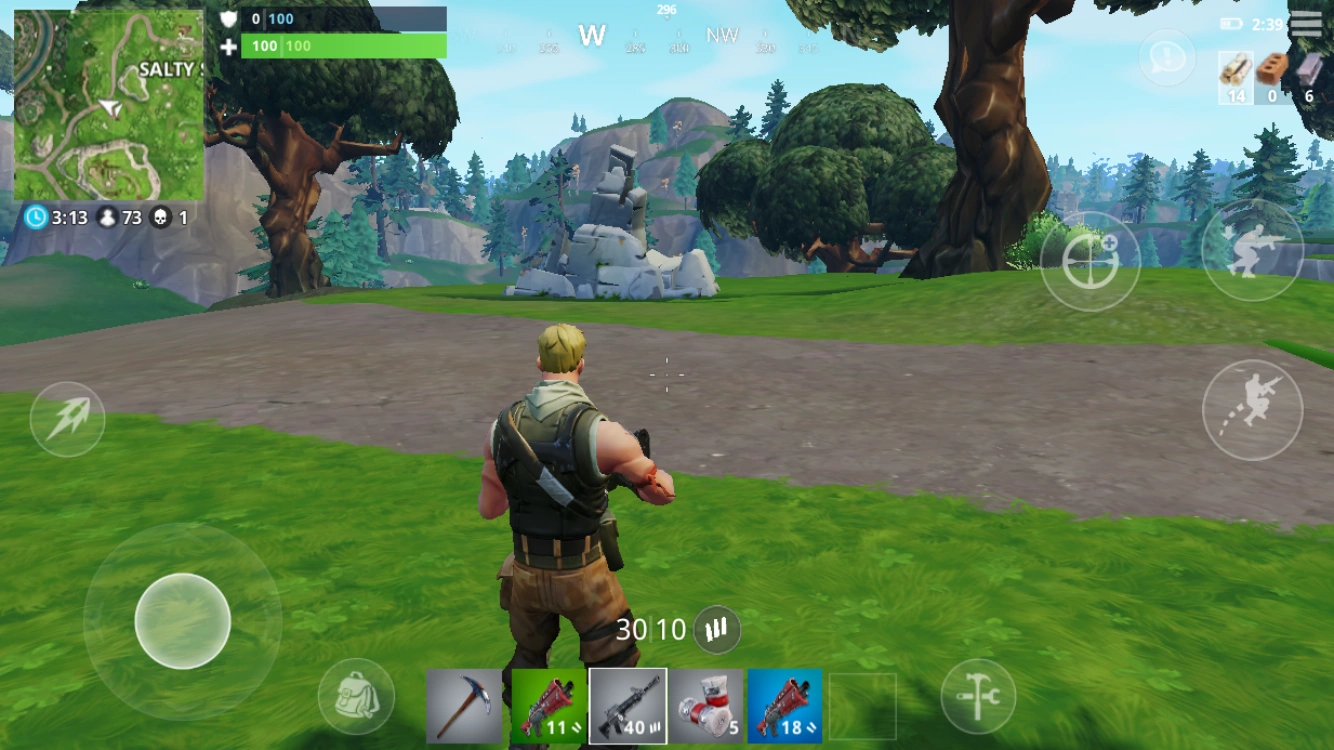
- Move: Bottom Left Joystick
- Crouch: Button In Top Right
- Jump: Button On Right
- Picking Up Items: Run Over Them
- Open/interact: Tap
- Switch items / weapons: Tap on item in bottom menu
- Aim: Use finger on right side of screen
- Aim using sights: use aim button on right side of screen
- Attack/fire/use item: Tap on screen, or tap button on left side of screen
- Reload: reload button near bottom of screen
- Backpack: tap on backpack
- Building menu: right-most bottom button
- Building: Tap icons to choose material/plans, tap screen to build
Windows
Windows[]
Windows (PC) and Mac controls can be bound however the player feels. Below is the default configuration.
| Control | Key |
|---|---|
| Move Forward | W
|
| Move Backward | S
|
- Move Forward: W
- Move Backward: S
- Move Right: D
- Move Left: A
- Cursor Mode: Left Alt
- Jump: Space Bar
- Fire/Melee: Left Mouse Button
- Target: Right Mouse Button
- Reload/Rotate: R
- Use/Interact: E
- Trap Equip/Picker: T
- Building Edit: G
- Repair/Upgrade: F
- Sprint: Left Shift
- Change Building Material: Right Mouse Button
- Reset Building Edit: Right Mouse Button
- Weapon Slot 1: 1
- Weapon Slot 2: 2
- Weapon Slot 3: 3
- Weapon Slot 4: 4
- Ability Slot 1: Z
- Ability Slot 2: X
- Ability Slot 3: C
- Gadget Slot 1: 5
- Gadget Slot 2: 6
- Building Slot 1: F1
- Building Slot 2: F2
- Building Slot 3: F3
- Building Slot 4: F4
- Trap Slot: F5
- Switch Quickbar: Q
- Slot Up: Mouse Wheel Down
- Slot Down: Mouse Wheel Up
- Chat: Enter
- Quick Chat Message: B
- Place a Note: N
- Spot Target: Middle Mouse Button
- Selected Building Type: V
- Toggle Map: M
- Toggle Inventory: I
- Skip Cutscene: Space Bar
- Resurrect: Left Mouse Button
- Respawn: Right Mouse Button
PlayStation
PlayStation[]
Building (Builder Pro)[]
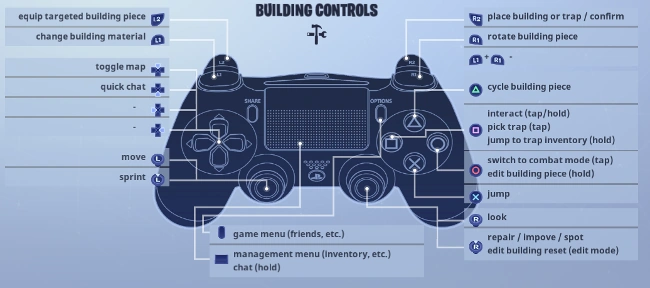
- Equip targeted building piece: L2
- Change building material: L1
- Toggle Map: Up
- Quick chat: Down
- Move: Left joystick
- Sprint: Press left joystick
- Game menu: Options button
- Management menu (inventory, etc.): Center pad
- Chat: Hold center pad
- Place building or trap/confirm: R2
- Rotate building piece: R1
- Cycle building piece: Triangle
- Interact: tap/hold Square
- Pick trap: Square
- Trap Inventory: Hold Square
- Combat Mode: Circle
- Edit building piece: Hold Circle
- Jump: X
- Look: Right joystick
- Repair: Press right joystick
Combat (Builder Pro)[]
Xbox
Xbox[]
Building (Builder Pro)[]
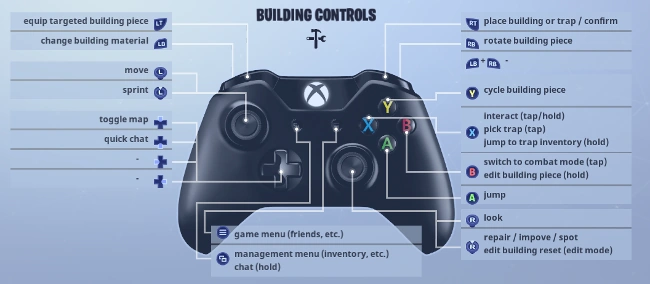
- Equip targeted building piece: LT
- Change building material: LB
- Toggle Map: Up
- Quick chat: Down
- Move: Left joystick
- Sprint: Press left joystick
- Game menu: Right center button
- Management menu (inventory, etc.): Left center button
- Chat: Hold left center button
- Place building or trap/confirm: RT
- Rotate building piece: RB
- Cycle building piece: Y
- Interact: tap/hold X
- Pick trap: X
- Trap Inventory: Hold X
- Combat Mode: B
- Edit building piece: Hold B
- Jump: A
- Look: Right joystick
- Repair: Press right joystick
Combat (Combat Pro)[]
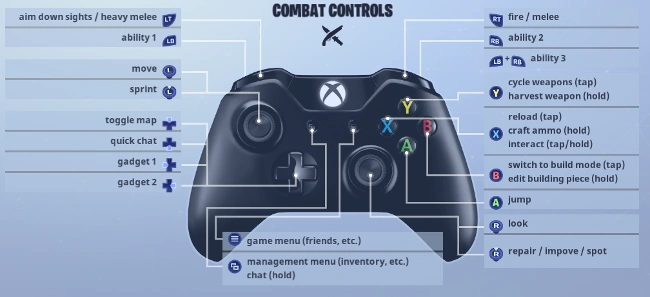
- Aim down sights/heavy melee: LT
- Ability 1: LB
- Toggle Map: Up
- Quick chat: Down
- Gadget 1: Left
- Gadget 2: Right
- Move: Left joystick
- Sprint: Press left joystick
- Game menu: Right center button
- Management menu (inventory, etc.): Left Center button
- Chat: Hold left center button
- Fire/melee: R2
- Ability 2: RB
- Ability 3: LB + RB
- Cycle weapon/harvest weapon: Y (hold to harvest)
- Interact: tap/hold X
- Reload: X
- Craft Ammo: Hold X
- Build Mode: B
- Edit building piece: Hold B
- Jump: A
- Look: Right joystick
- Repair: Press right joystick
Nintendo Switch
Nintendo Switch[]
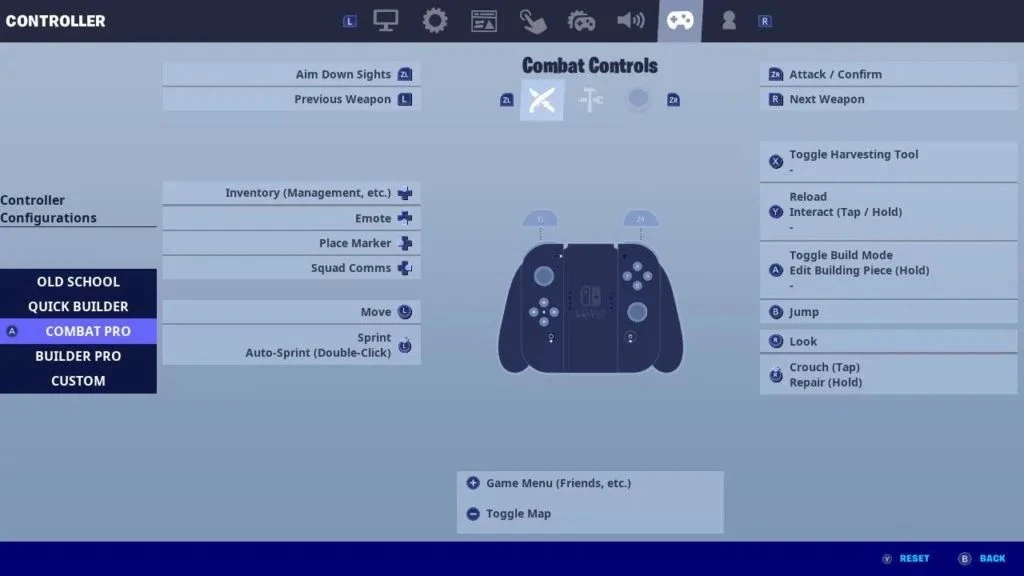
Combat Pro[]
- ZL: Change building material/swap trap
- ZR: Confirm
- L: Previous weapon
- R: Next weapon
- A: Toggle build mode/edit building piece
- B: Jump
- Y: Reload
- X: Toggle harvesting Tool
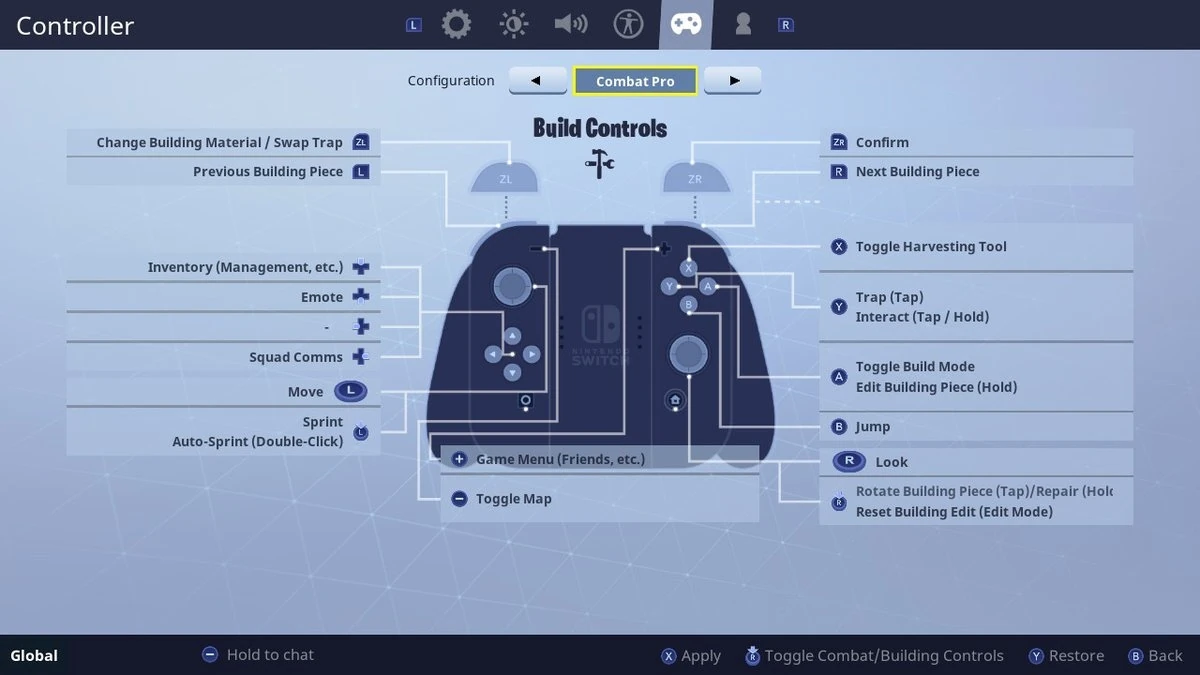
Builder Pro[]
- ZL: Aim Down Sights/Stair Piece (Tap Select / Tap Place)
- ZR: Attack / Confirm/Wall Piece (Tap Select / Tap Place)
- L: Previous Weapon/Roof Piece (Tap Select / Tap Place)
- R: Next Weapon/Floor Piece (Tap Select / Tap Place)
- A: Toggle Build Mode / Edit Building Piece (Hold)
- B: Jump
- Y: Reload / Interact (Tap / Hold) / Trap / Interact (Tap / Hold)
- X: Toggle Harvesting Tool